
Table of Contents
ToggleYour Nintendo Switch’s battery is dead, and you’re reaching for the AC adapter, except you can’t find it, or maybe it’s not charging properly anymore. It’s a frustration every Switch owner faces eventually. The AC adapter isn’t flashy like a new game or controller, but it’s absolutely essential. Whether you’re a casual player who picks up the Switch once a week or a competitive gamer grinding ranked matches, understanding your AC adapter can save you money, prevent hardware damage, and keep your gaming sessions uninterrupted. This guide covers everything you need to know about Nintendo Switch AC adapters in 2026, from official specs to third-party options and troubleshooting tips that’ll keep your console charged and ready to go.
Key Takeaways
- The official Nintendo Switch AC adapter delivers 15V/2.6A (39W) of power, and using underpowered or unstable third-party adapters can damage your console’s battery and charging circuit over time.
- A Nintendo Switch AC adapter converts household electricity into regulated power, protecting your console from power surges and electrical inconsistencies that could degrade battery health.
- Third-party USB-C adapters from certified brands like Anker or Belkin offer cost-effective alternatives at $15–25, but always verify USB-PD, UL, CE, or FCC certifications to avoid unbranded chargers that pose safety risks.
- Common signs your AC adapter is failing include slow charging (over 3 hours from 0–50%), overheating, intermittent charging, and physical damage—replace it immediately to prevent console damage.
- Proper AC adapter care includes storing cables in loose loops rather than tight coils, keeping the adapter in cool dry places, and using cable protectors when traveling to prevent connector wear and internal wire breakage.
- The Switch Lite uses an 18W adapter while standard Switch and OLED models use 39W adapters; while cross-charging works safely, using the correct wattage ensures optimal charging speed and battery longevity.
What Is a Nintendo Switch AC Adapter?
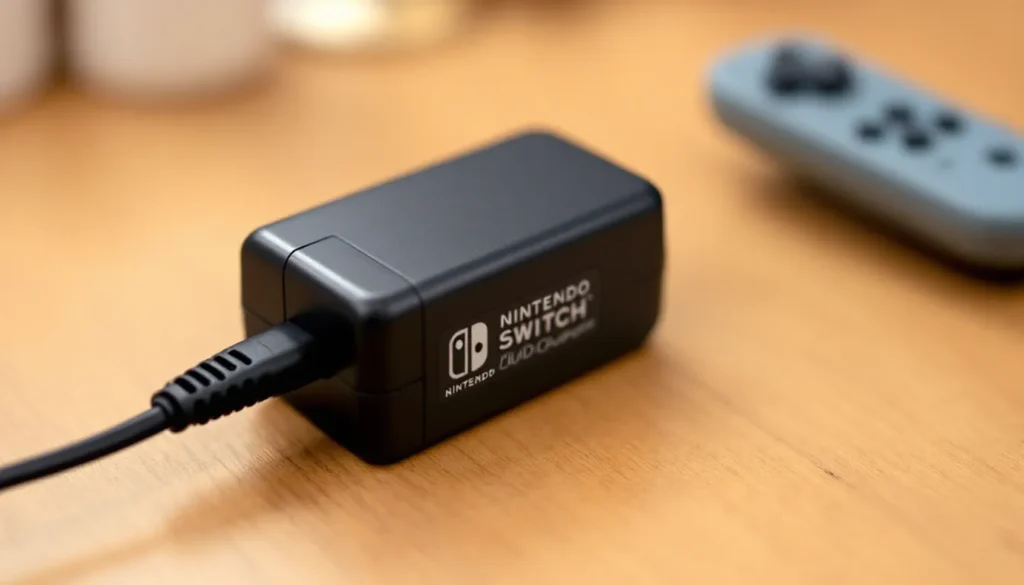
The Nintendo Switch AC adapter is a wall-mounted power supply that converts standard household electricity into the specific power requirements your console needs. Think of it as a translator between your wall outlet and your Switch, it takes 110V or 220V AC (depending on your region) and converts it into the regulated direct current your device requires.
Your Switch doesn’t draw power directly from the wall. Instead, the AC adapter steps down the voltage and regulates the current to exactly what the console needs, protecting it from power surges or inconsistent electrical supply. This is why using the wrong adapter or a damaged one can actually degrade your Switch’s battery health or, in worst cases, damage the console itself.
The adapter also serves as a charging dock when you use the original Nintendo dock. It’s the backbone of keeping your Switch powered up, whether you’re docked at home, using a portable charger while traveling, or charging while playing in handheld mode.
Official Nintendo Switch AC Adapter Specifications
Power Output and Voltage Requirements
The official Nintendo Switch AC adapter delivers 15V/2.6A (39W) of power. This is the standard power delivery spec that Nintendo has used across all Switch models since launch in 2017. Your Switch’s battery (4310mAh with 13.6V nominal voltage) charges optimally within these parameters, and charging from 0% to full typically takes around 5.5 hours in handheld mode.
If you’re using a third-party USB-C charger with higher wattage, say 65W or 100W, your Switch won’t overcharge. Modern USB Power Delivery (PD) standards include negotiation protocols that allow the Switch to request only the power it needs. But, using significantly underpowered adapters (anything below 15V/2A) means slower charging or, in some cases, the Switch won’t charge while in use.
The voltage consistency matters more than you might think. Nintendo’s official adapter maintains stable 15V output under load, which is critical for the console’s charging circuit. Third-party adapters sometimes fluctuate, which adds wear to the battery over time.
Connector Type and Compatibility
The Nintendo Switch uses a USB-C connector, the same standard found on modern Android phones, tablets, and most gaming devices. This makes it convenient, you can theoretically charge your Switch with any USB-C cable and compatible power adapter.
But, not all USB-C adapters are created equal. The official Nintendo Switch AC adapter features a proprietary connector that’s subtly different from standard USB-C in terms of pin configuration and charging negotiation. When Nintendo switched to USB-C (pun intended) for the Switch OLED model, they ensured broader compatibility, but the original Switch and Switch Lite have specific power delivery requirements.
A standard USB-C cable works fine, but the power adapter on the other end matters significantly. The Switch’s charging port includes smart circuitry that communicates with compatible adapters to negotiate power delivery safely.
Original vs. Third-Party AC Adapters: What’s the Difference?
Official Nintendo Adapters
Nintendo’s official AC adapter is manufactured to precise specifications and undergoes rigorous quality control. You’re getting a device that’s been tested to work seamlessly with your Switch, with consistent power delivery and safety features built in.
The official adapter is more expensive, typically $30-40 depending on your region, but it comes with Nintendo’s backing. If it fails within the manufacturer’s warranty (usually 12 months), Nintendo will replace it. The cable is also slightly more durable, rated for a higher number of bend cycles, and the connector is engineered to fit snugly in your Switch’s port without wobbling.
One advantage of the official adapter: it’s what your Switch was designed around. Engineers at Nintendo optimized charging algorithms, thermal management, and battery longevity with the official adapter in mind. You’re not running an experiment: you’re running the intended configuration.
Third-Party Alternatives
Third-party USB-C adapters from reputable manufacturers like Anker, Belkin, and RAVPower offer solid alternatives at lower price points, often $15-25. Many of these are well-engineered and include USB Power Delivery certification, which means they meet specific safety and compatibility standards.
The trade-off: third-party adapters aren’t guaranteed to have identical power delivery characteristics. Some deliver power slightly differently under load, which might result in marginally slower charging or, in rare cases, thermal issues. The variance is usually minimal with certified adapters, but it exists.
Where third-party adapters shine is versatility. If you own a MacBook, Android phone, and Nintendo Switch, a single 65W USB-C adapter can charge all three devices. This is practical for travelers who want to minimize cable clutter.
The risk: unbranded or uncertified adapters from unknown manufacturers can be dangerous. Cheap USB-C adapters without proper safety certifications can deliver inconsistent voltage, fry your Switch’s charging port, or degrade battery health rapidly. If you’re going third-party, stick with brands that have certifications and proven track records.
How to Identify a Faulty AC Adapter
Common Warning Signs
Slow or no charging: If your Switch charges from 0% to 50% in over three hours, or doesn’t charge at all while docked, the adapter is likely failing. Test this by checking if the charging indicator light (the small LED near the USB-C port) is illuminated when plugged in. No light usually means a dead adapter.
Heat generation: The adapter should get slightly warm during use, but not hot. If you can’t hold it comfortably for more than a few seconds, it’s overheating due to internal failure. This is a red flag for potential safety issues.
Intermittent charging: The adapter works sometimes but not others. This suggests a failing internal component or a damaged cable. Wiggling the USB-C connector and seeing if charging starts or stops is a quick diagnostic test.
Physical damage: Bent connectors, cracked casing, frayed cables, or burn marks are obvious signs of damage. Don’t use a visibly damaged adapter, the risk of electrical hazard outweighs any inconvenience.
Console-specific issues: Your Switch won’t charge even with the official dock and cable. If you’ve ruled out the cable (test it with a USB-C phone charger), the adapter is almost certainly the culprit.
When to Replace Your Adapter
Replace your AC adapter immediately if:
- It shows any of the warning signs above
- It’s been damaged by water, extreme heat, or physical impact
- It’s generating unusual smells (burning plastic, ozone, etc.)
- You’re using an unbranded adapter that you’re unsure about
If your adapter is working fine but you’re concerned about age, Nintendo adapters from the original 2017 Switch launch are now nearly a decade old. Most components degrade over time, especially the capacitors inside the power supply. If your original adapter is from 2017-2018, having a replacement on hand isn’t a bad idea, especially if you game frequently.
Buying Guide: Choosing the Right AC Adapter for Your Switch
Safety Certifications to Look For
When shopping for a third-party adapter, check for these certifications:
USB Power Delivery (USB-PD) certification: This ensures the adapter follows industry standards for safe power delivery over USB-C. Look for the USB-IF certification mark on the product or packaging.
UL (Underwriters Laboratories), CE, or FCC marks: These indicate the adapter has passed safety testing in North America (UL), Europe (CE), or meets FCC requirements. Reputable brands display these prominently.
UL 2089 certification: Specific to USB power adapters, this is the gold standard for ensuring safe charging without fire risk or electrical hazards.
If a cheap adapter doesn’t list any certifications, avoid it. You’re not saving money by risking your Switch or your home’s electrical safety. According to Nintendo Life, fake and substandard chargers have caused damage to Switch consoles worldwide, so due diligence here matters.
Price vs. Quality Considerations
You don’t need to spend $40 on every backup adapter. A certified third-party 15V/2.6A USB-C adapter from a trusted brand costs $15-25 and performs nearly identically to the official one. The difference in longevity is marginal for most users.
But, consider what you’re powering. If you’re charging your Switch alongside other devices using a multi-port adapter, you’re splitting available wattage. A single 39W adapter works great for just the Switch, but a 65W or 100W USB-C adapter gives you flexibility to charge multiple devices simultaneously without throttling. For under $30, you can find multi-port adapters from Anker or Belkin that are certified and versatile.
Budget tier ($10-15): Basic certified USB-C adapters. Check for certifications and reviews.
Mid-tier ($20-30): Quality options from established brands with warranties and consistent reviews.
Premium tier ($35+): Official Nintendo adapter or high-end third-party options with exceptional build quality and longer warranties.
For Switch owners in gaming-heavy households or frequent travelers, investing in one official adapter and one or two certified third-party backups is the sweet spot. This covers redundancy without very costly.
How to Properly Care for Your Nintendo Switch AC Adapter
Storage and Cable Management
The most common cause of AC adapter failure is cable damage from poor storage. When you’re not using your adapter, avoid tightly coiling the cable around the adapter head. This stresses the cable’s insulation at the point where it connects to the power brick. Instead, use a loose loop or cable organizer, leaving a few inches of slack.
When traveling, use a cable protector or wrap the USB-C connector gently in a soft cloth to prevent bend damage. The connector is the most vulnerable part, repeated bending at the connection point can eventually cause internal wire breakage.
Store the adapter in a cool, dry place. Extended exposure to heat (like a car dashboard in summer) accelerates capacitor degradation inside the power supply. Humidity can also cause corrosion on the connector pins. A drawer or closet is ideal: a hot garage or humid basement is not.
If you use your Switch in multiple rooms or travel frequently, AC adapter Nintendo Switch: covers additional strategies for managing multiple adapters without wear and tear.
Troubleshooting Common Issues
Adapter plugged in, but Switch won’t charge:
- Check the outlet, plug a lamp or phone charger into the same socket to confirm the outlet has power
- Inspect the USB-C cable for damage or debris inside the port
- Try cleaning the Switch’s USB-C port gently with a dry cotton swab (no liquid)
- If using a third-party cable, test with the original Nintendo cable if available
- Force restart your Switch by holding the power button for 15 seconds
Slow charging:
- Confirm you’re using at least a 15V/2A adapter, lower wattage adapters charge slower
- Close all open games and apps: active use while charging slows charging significantly
- Dock the Switch (if you have one) rather than using cable-only charging
- Avoid using the console while charging, this is the most common reason for perceived slow charging
Adapter gets hot during use:
This is usually normal, but it shouldn’t be uncomfortable to hold. If it’s legitimately hot (above ~113°F / 45°C):
- Check for blocked vents on the adapter
- Ensure the adapter isn’t in a confined space like a drawer while in use
- Consider replacing the adapter if it continues overheating
Most adapter issues resolve with simple troubleshooting, but if nothing works, the adapter likely needs replacement.
AC Adapters for Nintendo Switch Revisions and Models
Original Switch vs. Switch OLED Compatibility
The original Nintendo Switch (2017 launch) and the Switch OLED (2021 launch) both use 39W USB-C adapters with 15V/2.6A output. This means the official adapters are cross-compatible, you can use an OLED adapter on the original Switch and vice versa.
The Switch OLED also introduced improved USB-C implementation, making it slightly more compatible with generic USB-C chargers. But, Nintendo still recommends using the official adapter for both models to ensure battery longevity.
One caveat: the original Switch (2017) came with a proprietary connector in early revisions. If your original Switch is from the very first months of launch and you haven’t updated its dock, you might have a different connector type. This is rare, but it’s worth checking your adapter’s specs if you’re planning to swap between consoles.
Switch Lite Charging Considerations
The Switch Lite is fully handheld-only, so there’s no dock involved. It charges via USB-C, but here’s the quirk: Nintendo included a 5.9V/3A (18W) adapter with the Switch Lite, not the standard 15V/2.6A.
This is confusing, and it’s a common source of mix-ups. You can charge a Switch Lite with a 15V/2.6A adapter (like the standard Switch adapter), and it will work safely, but it’ll charge slower. Conversely, you can charge the original Switch with an 18W Lite adapter, but again, it’s suboptimal.
For gamers with multiple Switch models, getting the correct adapter for each console is worth the small extra investment. A Switch Lite owner who accidentally grabs the OLED adapter will get slower charging: an original Switch owner using a Lite adapter won’t damage anything, but charging takes longer.
According to PCMag tech reviews, USB Power Delivery standards mean most modern multi-wattage USB-C adapters can intelligently negotiate power with your Switch, making them versatile options for households with multiple Nintendo devices. If you’re buying one adapter to cover both a Switch and Switch Lite, look for a certified multi-device USB-C option rated for 45W or higher.
Conclusion
The Nintendo Switch AC adapter is one of those accessories that rarely gets attention until it stops working. But now you know it’s more than just a cable, it’s a precision power supply engineered to keep your console healthy and charging efficiently. Whether you stick with the official Nintendo adapter or explore certified third-party options, the key is understanding your console’s power requirements (15V/2.6A for standard models), recognizing the warning signs of a failing adapter, and taking care of your cable through proper storage and handling.
If you’re a competitive gamer who can’t afford downtime, keep a backup adapter handy. If you travel frequently, a versatile multi-device USB-C charger simplifies your setup. And if your current adapter is aging or showing signs of wear, replacing it now prevents the frustration of a dead console during your next gaming session.
The Nintendo Switch Archives at Questtiny cover everything from accessories to gameplay guides, so you’ll find answers to all your Switch-related questions. And if you’re collecting everything Switch-related, don’t sleep on Nintendo Switch Amiibo: Unlock Exclusive Content and Boost Your Gaming Experience, these collectibles unlock exclusive in-game content across dozens of titles.
Your Switch is an investment. Keeping it charged properly ensures it stays in your gaming rotation for years to come.
<h2 id="” data-id=””>TEMP_PLACEHOLDER