
Table of Contents
TogglePortable gaming without reliable internet feels like playing with one hand tied behind your back. Whether you’re grinding ranked matches, trading Pokémon, or downloading updates at a coffee shop, a stable data connection turns your Nintendo Switch from a toy into a proper gaming device. Verizon’s coverage and data plans make it possible to play online anywhere, if you know how to set it up right. This guide walks through everything you need to know about using Verizon with your Nintendo Switch in 2026, from hotspot setup to troubleshooting connection drops.
Key Takeaways
- Use Verizon hotspot from your smartphone to connect your Nintendo Switch, since the Switch doesn’t have built-in 5G or LTE capability.
- Choose a Verizon unlimited plan with at least 30GB monthly hotspot (50GB recommended) to accommodate game downloads and system updates without hitting throttle limits.
- Position your phone within 15 feet of your Switch with strong signal strength (three bars or higher) and use 2.4GHz hotspot mode for stable, consistent connections.
- Turn-based RPGs like Pokémon and asynchronous multiplayer games work flawlessly over Verizon hotspot, but competitive, fast-paced games suffer from the added 30-80ms latency compared to home internet.
- Monitor background apps, disable auto-off hotspot features, and play during off-peak hours to optimize gaming performance and prevent mid-session disconnections.
What You Need to Know About Verizon & Nintendo Switch Connectivity
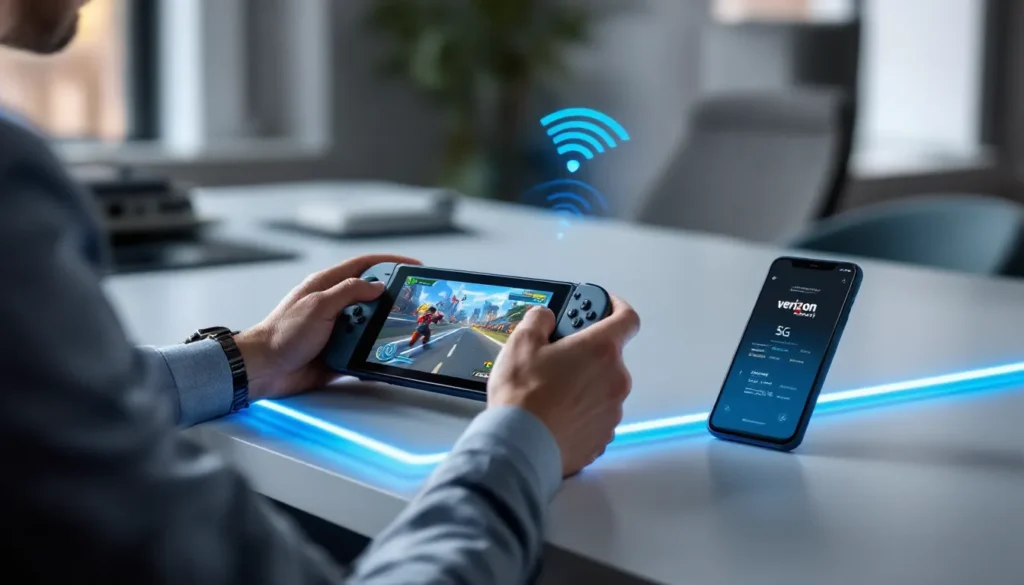
The Nintendo Switch doesn’t have built-in 5G or LTE, it’s Wi-Fi only. That means you can’t directly insert a Verizon SIM card or connect to cellular networks without an intermediary device. Instead, you’ll use your smartphone or a dedicated mobile hotspot as a bridge between Verizon’s network and your Switch.
Verizon covers over 99% of the U.S. population, and their 5G network reaches most urban and suburban areas. For Switch gaming, this matters because stable signal strength directly impacts latency, connection reliability, and download speeds. If you’re in a Verizon 5G area, you’ll see lower ping and faster patch downloads compared to 4G LTE alone.
The key constraint is hotspot data limits. Most Verizon plans throttle hotspot speeds after you hit a certain threshold, typically 30GB or 50GB per month, depending on your plan tier. Gaming doesn’t consume massive amounts of data per se (an hour of online multiplayer uses roughly 50-150MB), but downloading new games or patches eats through your allowance fast. A new Nintendo Switch game runs 5-50GB, and system updates can push 2-5GB. Plan accordingly.
Third-party hotspot devices like the Verizon Jetpack also work, but they’re an extra expense. For most gamers, tethering from your phone is the most practical solution.
Mobile Hotspot Setup: Using Verizon Data for Your Nintendo Switch
Step-by-Step Setup Guide for Verizon Hotspot Connection
Setting up Verizon hotspot on your Switch takes about five minutes if your phone supports it. Here’s the exact process:
On your Verizon phone:
- Open Settings and navigate to Hotspot (location varies by Android/iOS, but usually under “Network & Internet” or “Personal Hotspot”)
- Enable the hotspot and note the network name (SSID) and password, you’ll need both
- Keep your phone within 10-15 feet of your Switch: signal strength matters
On your Nintendo Switch:
- Go to Settings > Internet Settings > Internet > New Network
- Select the hotspot SSID from your phone
- Enter the password exactly as shown (case-sensitive on most phones)
- Let the Switch complete the connection test, it’ll show “Connected” and display your signal strength
Once connected, your Switch downloads system updates and can access multiplayer servers. The connection will persist until your phone moves out of range or the hotspot is manually disabled.
Pro tip: If your phone has two hotspot modes (2.4GHz vs 5GHz), stick with 2.4GHz for the Switch. While 5GHz offers faster speeds in theory, it has worse range and wall penetration. The Switch will maintain a more stable connection on 2.4GHz, even if it’s slightly slower.
Optimizing Your Hotspot for Gaming Performance
Not all hotspot connections are created equal. Placement and settings matter significantly for gaming.
Phone placement is critical. Put your phone on a high surface in the same room as your Switch, avoid pockets, bags, or behind obstructions. Walls and metal objects degrade signal. In a two-story house, gaming on a different floor from your phone can introduce lag spikes.
Reduce hotspot load by ensuring your phone isn’t simultaneously uploading photos, syncing cloud backups, or downloading updates. Every background process competes with your Switch’s bandwidth. Close unnecessary apps or toggle airplane mode briefly before gaming (just re-enable hotspot after).
Distance matters more than you’d think. Test your connection at various distances. Most phones maintain good hotspot range up to 30 feet in open space, but thick walls cut range in half. If you’re at the edge of signal and experiencing lag, move closer or switch rooms.
Check your Verizon signal bars on your phone’s status bar before gaming. If you see one or two bars, expect inconsistent connection on your Switch. You want three bars or higher for stable gaming. Cellular signal fluctuates, especially near buildings or outdoors, so pick a consistent location.
Best Verizon Plans for Portable Gaming
Unlimited Plans & Gaming Data Needs
Verizon’s unlimited plans are the practical choice for Switch gamers who want zero data stress. Here’s what Verizon currently offers as of March 2026:
- Verizon Unlimited Premium ($90/month for a single line): Full speed data, 50GB monthly hotspot, priority network access
- Verizon Unlimited Plus ($75/month): Full speed data, 30GB monthly hotspot, standard priority
- Verizon Get More Unlimited ($85/month): Full speed data, 50GB monthly hotspot, higher tier features
For casual Switch gaming, a few hours weekly, occasional multiplayer, standard patches, the 30GB hotspot tier usually suffices. You’re looking at roughly 500MB-1GB per month from actual gaming. The real consumption comes from game downloads and system updates, which don’t happen every day.
If you download new games frequently (say, two 20GB Switch titles per month), you’ll want the 50GB hotspot tier to stay comfortable. Running out mid-month forces speed throttling (usually 600Kbps-2Mbps), which makes online gaming unplayable.
Older Verizon plans with limited hotspot (5GB or 10GB) aren’t recommended for Switch gaming if you plan any downloads. You’d burn through your allowance in one or two new game downloads and hit throttled speeds for the rest of the month.
Hotspot Data Limits & Gaming Bandwidth
Understanding exactly how much data gaming consumes helps you plan your hotspot budget.
Online multiplayer (streaming gameplay, not downloading): Approximately 50-150MB per hour depending on the game. Super Smash Bros. Ultimate is on the lighter end (~50MB/hour): Splatoon 3 is heavier (~120MB/hour) due to constant position updates and map data. Compare this to video streaming (1-5GB/hour on Netflix) and you’ll see gaming is remarkably efficient.
Game downloads: This is where your hotspot burns fast. A typical Nintendo Switch game is 10-50GB. The Legend of Zelda: Breath of the Wild is roughly 17GB: newer titles like Super Smash Bros. Ultimate run 26GB. Downloading a single AAA title can consume a third to a half of your monthly 30GB hotspot allowance in minutes.
System updates: Nintendo releases system updates roughly monthly, ranging from 500MB to 5GB. These are unavoidable if you want online access.
Real example: Say you have a 30GB hotspot limit. Download a 20GB game (16 hours of play), play 10 hours online (0.5-1.5GB), and grab a system update (1GB). You’ve used ~22-23GB, leaving 7-8GB buffer. This is tight but workable if you space out downloads. Add a second game, and you’re throttled.
The takeaway: 30GB is tight for active gamers who download frequently. 50GB is the comfortable threshold. And yes, Verizon’s hotspot throttling does severely impact gaming, speeds drop from 100+ Mbps to 1-2 Mbps, making most online games unplayable.
Nintendo Switch Gaming While Traveling: Performance Tips
Latency, Ping, & Connection Stability
When you’re gaming over mobile hotspot instead of a wired home connection, latency becomes noticeable fast. Home broadband typically offers 10-30ms latency: Verizon hotspot adds 30-80ms, sometimes more in congested areas. For turn-based games like Pokémon Scarlet & Violet, this doesn’t matter. For competitive fighting games or shooters, it’s a problem.
What’s playable over hotspot:
- Turn-based RPGs: No latency penalty
- Asynchronous multiplayer (like Animal Crossing: New Horizons): Tolerant of lag
- Single-player games: No impact at all
- Casual co-op (like Mario Kart 8): Playable but occasionally janky
What struggles:
- Competitive ranked matches (VALORANT on Switch, fighting games, fast-paced shooters): 50ms+ latency puts you at a disadvantage. You’ll notice aim assist responding slower, delayed button inputs, and rubber-banding
- Real-time PvP with frame-perfect mechanics: Basically unplayable
Verizon’s 5G coverage reduces hotspot latency by 10-30ms compared to 4G LTE, so if you’re in a 5G area, competitive gaming is more viable. Check Verizon’s coverage map before relying on this.
Stability matters more than peak speed. A consistent 20Mbps connection is better for gaming than 100Mbps that fluctuates wildly. Mobile networks are inherently less stable than home internet, movement, network congestion, and weather all cause fluctuations. When testing your Verizon hotspot for gaming, play a multiplayer match and note connection drops or lag spikes, not just download speed.
Tips for stable connections while traveling:
- Stay stationary while playing. Moving between rooms or driving causes your phone to switch between cell towers, temporarily disrupting connection
- Play in areas with strong Verizon signal (three bars or higher). If you’re somewhere with weak signal, you’re fighting an uphill battle
- Avoid peak hours (6 PM–10 PM) when networks are congested. Midday gaming typically sees lower latency
- Keep your phone plugged in. Hotspot drains battery fast, and a dying phone may reduce hotspot output quality
Best Games for Mobile Data Connection
Not all Switch games are created equal for mobile play. Some are practically designed for it.
Turn-based RPGs are your sweet spot. Games like the Pokémon series (including Pokémon Legends: Arceus and the newer generations), Fire Emblem: Three Houses, and Disgaea 5 never require fast reflexes or low latency. You can pause, strategize, and play at your own pace. These work flawlessly over Verizon hotspot.
Asynchronous multiplayer games sidestep latency entirely. Animal Crossing: New Horizons lets you visit other islands, but actions don’t happen in real-time, data syncs when you enter or leave an area. Splatoon 3 has lag, sure, but it’s casual enough that 50-80ms doesn’t ruin the experience. Mario Kart 8 Deluxe is playable over hotspot if you’re not grinding ranked modes: casual racing tolerates lag better than competitive.
Single-player games with online features (like Ghost of Tsushima‘s co-op mode or standalone story campaigns) depend on the specific title, but generally you’re fine. The eShop recommends checking individual game pages, but most story-driven games work perfectly.
Avoid over hotspot: Anything demanding consistent, low-latency multiplayer. Most modern shooters on Switch or fast-paced competitive fighters (like Super Smash Bros. Ultimate ranked) will frustrate you. You can play them, but you’ll feel disadvantaged.
Verizon 5G & Nintendo Switch Gaming Experience
Verizon’s 5G network is a significant upgrade for mobile gaming, but its benefit to Nintendo Switch depends on where you are and what you’re playing.
5G speeds theoretically reach 1Gbps+, compared to 4G LTE’s typical 10-100Mbps. For the Switch, this sounds amazing until you realize the Switch maxes out at roughly 50Mbps, it can’t fully use 5G’s peak speeds. That said, 5G’s real advantage isn’t peak speed: it’s lower latency and less congestion.
Latency improvement is where 5G shines. A typical 4G LTE hotspot shows 40-80ms latency: 5G hotspots see 30-50ms. That 20-30ms reduction is genuinely noticeable in competitive games. If you’re in a 5G coverage area and relying on Verizon hotspot for ranked Super Smash Bros. Ultimate or similar titles, 5G narrows the gap between mobile and home internet.
Coverage matters. Verizon’s 5G Ultra Wideband (UWB) is available in major cities and some suburban areas, but it’s sparse outside that. Rural and less developed areas still rely on 4G LTE. Check Verizon’s coverage map to confirm your location has 5G.
Practical impact: For casual gaming, the difference between 4G and 5G is imperceptible. For competitive or latency-sensitive play, 5G is noticeably better. If you’re traveling through different regions, you might have 5G in cities but 4G elsewhere, expect performance to vary.
Verizon’s premium unlimited plans (Get More Unlimited, Unlimited Premium) prioritize 5G access, while basic plans may see slower 5G speeds during network congestion. If you’re serious about using hotspot for gaming, prioritization matters on a congested network.
One more thing: 5G burns battery faster than 4G on both your phone and Switch. If you’re gaming for extended periods, have a portable charger handy.
Common Issues & Troubleshooting Solutions
Disconnection Problems & Fixes
Your Switch randomly dropping its connection to the Verizon hotspot is maddening mid-match. Here’s what causes it and how to fix it.
Your phone’s hotspot disabled on its own. Most phones auto-disable hotspot after 10-15 minutes of inactivity to save battery. If your Switch isn’t actively using data (say, you’re in a menu or waiting for a match to load), the hotspot might shut down. Solution: Go into your phone’s hotspot settings and disable the auto-off feature. Alternatively, keep your Switch actively connected by occasionally downloading something small.
Signal strength dropped. Your phone moved, the network switched towers, or interference increased. If you were sitting at the edge of signal range, moving a few feet can disconnect. Solution: Keep your phone in a consistent location with strong signal bars (three or higher). If you’re in a building, move to a window or higher floor.
Router interference (less common but possible): If your Verizon hotspot is on 2.4GHz and there’s a Wi-Fi router nearby on the same frequency, interference can cause drops. Solution: Switch your hotspot to 5GHz temporarily (though this reduces Switch range), or move away from competing Wi-Fi networks.
Too many devices on the hotspot. If your phone is hotspotting to your Switch, a laptop, and a tablet simultaneously, bandwidth is split and connections destabilize. Solution: Only connect the Switch (and one other device max) to the hotspot during gaming.
Your Verizon account has deprioritization enabled. If you’ve exceeded your hotspot data limit or Verizon has categorized your account as “high-use,” they may temporarily deprioritize your traffic in congested areas, causing drops. Solution: Monitor your Verizon bill to see current hotspot usage: if you’re consistently near your limit, upgrade to a higher-tier plan or reduce background data usage on your phone.
Slow Speed Issues & Optimization
You’re connected, but your speeds are slow, downloads crawl, games feel sluggish, or online lag is unbearable.
You’ve hit your hotspot data throttle limit. This is the #1 culprit. Once you exceed your monthly hotspot limit (30GB or 50GB depending on your plan), Verizon throttles speeds to 600Kbps-2Mbps. That’s unplayable for anything real-time. Solution: Check your Verizon account to confirm you haven’t exceeded your limit. If you have, either wait for your billing cycle to reset or upgrade your plan temporarily.
Network congestion. During peak hours (evenings, weekends), Verizon’s network is congested. Even if you’re on unlimited 4G, speeds drop as everyone competes for bandwidth. Solution: Play during off-peak hours (midday, early morning) when possible. If you’re in a 5G area, you’ll see better performance because 5G handles congestion more efficiently.
Poor signal strength. Slow speeds are often a sign your phone is in a weak signal area (one to two bars). Signal strength directly impacts data rate. Solution: Move your phone to a location with better signal. Test from different rooms or go outside to confirm if weak signal is the culprit.
Your phone’s processor is bottlenecked. Older phones (5+ years old) sometimes can’t push hotspot speeds effectively, especially on 5G. Solution: Not much you can do here except recognize the limitation. Newer phones hotspot more efficiently.
Background data on your phone. Apps syncing, cloud backups running, or OS updates downloading in the background compete with your Switch’s bandwidth. Solution: Disable background app refresh for non-essential apps, pause cloud syncing, and avoid system updates during gameplay.
Quick speed test: To confirm it’s a Verizon network issue and not your phone’s hotspot, use a speed-testing app on your phone while hotspotting to your Switch. Compare the phone’s speeds to what your Switch reports. If your phone shows 50Mbps but your Switch only gets 5Mbps, your phone’s hotspot hardware is struggling. If both are slow, it’s Verizon’s network.
Resolving slow speeds sometimes means accepting limitations, mobile hotspot will never match home broadband. The Nintendo Switch Archives has additional guides for Switch connectivity and gaming setup if you want deeper dives into specific scenarios.
Conclusion
Verizon + Nintendo Switch is a solid combination for portable gaming in 2026, but it requires understanding its limitations. You’re trading the stability and speed of home internet for mobility, and that trade-off is worth it if you’re willing to optimize your setup.
The practical summary: Use an unlimited Verizon plan with at least 30GB monthly hotspot (50GB is better), place your phone within 15 feet with strong signal, disable non-essential background apps, and stick to games that tolerate latency well. Avoid hotspot gaming during peak hours and in areas with weak signal.
For competitive gaming or marathon downloads, your home internet will always be superior. But for casual multiplayer, turn-based RPGs, and quick gaming sessions on the go, Verizon hotspot makes your Switch genuinely portable. More players are gaming on mobile hotspots than ever before, and with proper setup, the experience is solid.
You’re not going to break Verizon’s service or your game experience by gaming over hotspot, just be smart about which games you play, when you download updates, and which Verizon plan you subscribe to. The setup takes five minutes, and from there, your Switch becomes as portable as your phone. That’s the real win.